Container clearance at a sea-port scanner, cut from 6-7 minutes to under a minute per container: advance scan lists, one room instead of two floors, and a digital register that checks itself.
Process improvementLean operationsBottleneck analysisCapacity planningMicrosoft FormsExcel automation
Context: the container scanning unit at a major sea port, during my posting in imports and exports (see experience) · My role: creator and sole project lead, working under the guidance of senior authorities · The name:Pravah means “flow” in Hindi.
6-7 minto clear one container before
45-60 sto clear one container after
~85%less time per container
1 windowone room for scanning and image analysis, instead of two floors
Every vesselscan list received in advance, so staff matched the workload
0manual checks to confirm that every marked container was scanned
Clearing one container through the scanner took 6-7 minutes on average. A paper receipt travelled between two officers on two different floors for every single container, nobody knew in advance how many containers were coming, and the scanning registers were kept by hand. Trucks queued at the scanner.
What I changed
Three things: the list of containers marked for scanning now reached the unit as soon as a vessel arrived; the scanning and image-analysis stations moved into one room so containers were cleared at a single window; and the paper register became a web form whose entries were checked automatically against each vessel’s scan list.
My role
I was given the task of streamlining the unit. I created the new set-up and was the sole project lead, working under the guidance of senior authorities: mapping the old process, finding the bottlenecks, planning the move of both systems into one room, arranging the advance scan lists, and building the digital register.
The result
Clearance time fell from 6-7 minutes to 45 seconds to a minute per container, and the long queue at the scanner cleared. Officers were rostered to the expected volume, and whether every marked container of a vessel had been scanned became visible at a glance, with no manual checks.
I ran Pravah as a project from start to finish: I studied the process, proposed the redesign and got it approved, planned the change with the officers on duty, tried it on real shifts first, trained the team and made it the normal procedure, monitored the results, and handed it over when my posting ended.
Initiate2020 · time study, approval
→
Plan2020 · one window, scan lists
→
Set up2020 · one room, web-form register
→
Pilot2020 · real shifts, adjustments
→
Roll out and train2020 · every shift
→
Monitor2020 · clearance times, checks
→
Closehandover to my successor
The full life cycle, owned end to end, under the guidance of senior authorities.
Owner
Creator and sole project lead of the redesign: the analysis, the plan, the pilot, the rollout and the results.
Sponsor and approval
Senior authorities approved the change and received the progress reports; I worked under their guidance throughout.
Users and stakeholders
The officers on scanning and image-analysis duty, and everyone waiting on container release, from the terminal to the traders.
Decisions I owned
The new layout, the single clearance window, the advance scan list, the digital register, and how the change was introduced on the shifts.
Phase
What I did
Output
Initiate
Walked and timed the process and found that most of the 6-7 minutes was waiting and paper moving between floors; proposed the redesign and obtained approval
Approved proposal
Plan
Worked out the new set-up with the officers on duty: both systems in one room, a single clearance window, scan lists received in advance, and a digital register
Agreed design
Set up
Arranged the single room and window, the routine for the advance scan list, and a simple web-form register checked automatically against the scan list
A ready process
Pilot
Tried the new way of working on real shifts and adjusted it until it ran smoothly
Refined procedure
Roll out and train
Explained the new routine to all the officers and made it the normal procedure on every shift
New routine on every shift
Monitor and control
Watched clearance times and the automatic register checks, and reported the results to senior authorities
6-7 minutes down to under one
Close and hand over
Handed the procedure and the register over to the next officer when my posting ended
At a port, containers selected for non-intrusive inspection pass through a scanner on their truck. The scan image is read for anything abnormal, and only then is the container released. The control itself was sound. The way the work was organised around it was not.
Truck arrivesdriver hands over a receipt
→
Officer 1checks, scans, endorses by hand
→receipt carried to another floor
Officer 2reads the image for abnormalities
→receipt carried back
Releaseonly after clearance
The old process: one container at a time, with the paperwork walking between floors. Average: 6-7 minutes per container.
1 · Paper on the move
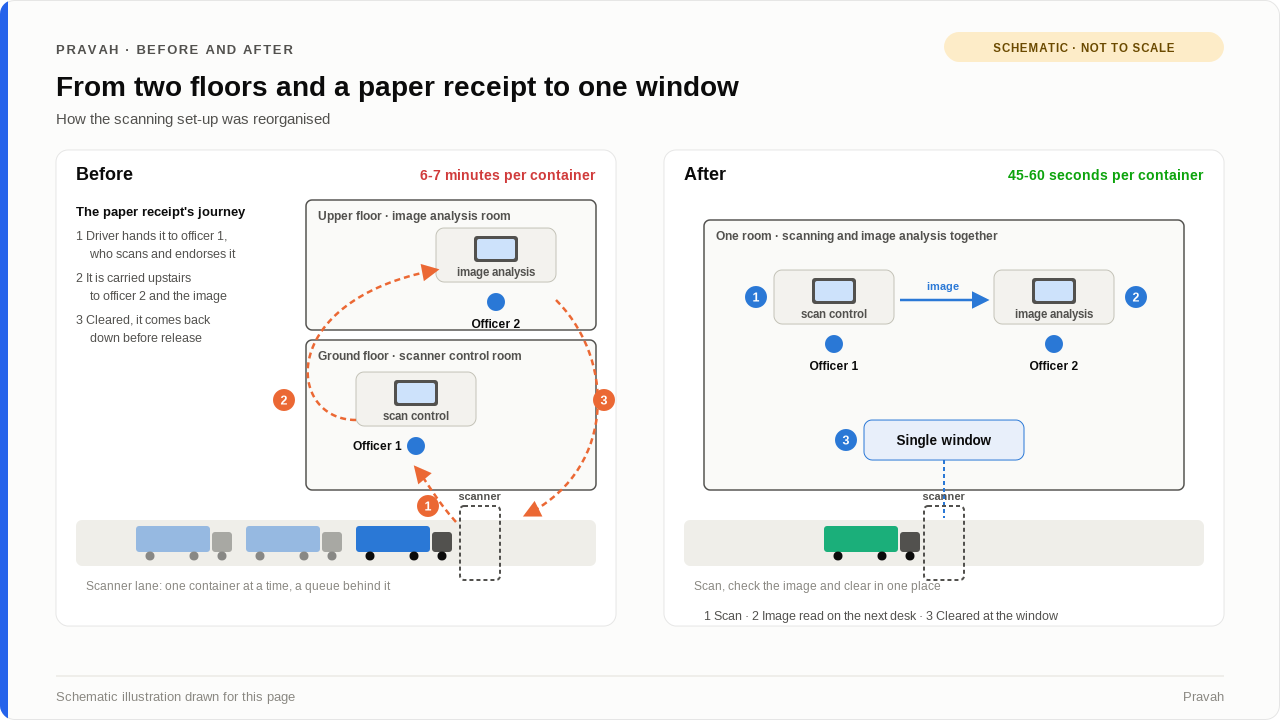
Every receipt had to travel from the scanner room to a different floor, where a second system showed the image and a second officer cleared it, and then back again. The scanner sat idle while the truck waited for its paperwork to make the round trip.
2 · Working blind
The unit did not know how many containers were coming for scanning. Officers could not be rostered to the workload, so they were unprepared at peaks and under-used at quiet times.
3 · Registers nobody could reconcile
Scans were recorded in physical registers. Checking whether every container marked on a vessel had actually been scanned meant going through the registers line by line, which was slow and easy to get wrong.
The cost showed up as a long queue of trucks at the scanner: slower cargo release for traders, congestion in the terminal, and constant pressure on officers to hurry a check that matters for enforcement.
Walk the process and time it. I followed containers from arrival to release and timed each step. Most of the 6-7 minutes was not scanning or image analysis at all; it was waiting, and paper moving between floors.
Separate value from waste. The scan and the reading of the image are the control, and they had to stay. Carrying receipts, waiting for them and re-endorsing them added nothing.
Find the real constraint. The bottleneck was not the scanner but the hand-off between the two officers. Any improvement elsewhere would just move the queue.
Redesign around one window. I planned the reorientation of the set-up so that both systems, the scan control and the image analysis, sat in a single room, with one point where a container is cleared.
Fix the information upstream. The unit needed to know what was coming before the trucks arrived, so the list of containers marked for scanning was made available as soon as a vessel came in.
Digitise the control. Paper registers were replaced by a simple web form, with the results checked automatically against the scan list.
Settle it into routine. The new way of working was explained to the officers, tried out on real shifts and adjusted until it ran as the normal procedure.
As soon as a vessel came in, the list of its containers marked for scanning was given to the unit. Officers knew how many containers to expect and which ones, so the right number of officers could be on duty, and the list became the reference for checking that nothing was missed.
The set-up before and after the reorganisation. Schematic, not to scale.
Both systems were moved into a single room. The officer at the scan control and the officer reading the image now work side by side: the image appears on the next desk the moment the scan is done, and the container is cleared from one window. No receipt has to leave the room, so the round trip, and the wait that came with it, disappeared. The two-officer check stayed exactly as it was; only the walking went.
Truck arrivescontainer on the scan list
→
Scanofficer 1
→
Image readofficer 2, same room
→
Cleared at one window45-60 seconds in all
The new process: the same two checks, without the paper round trip.
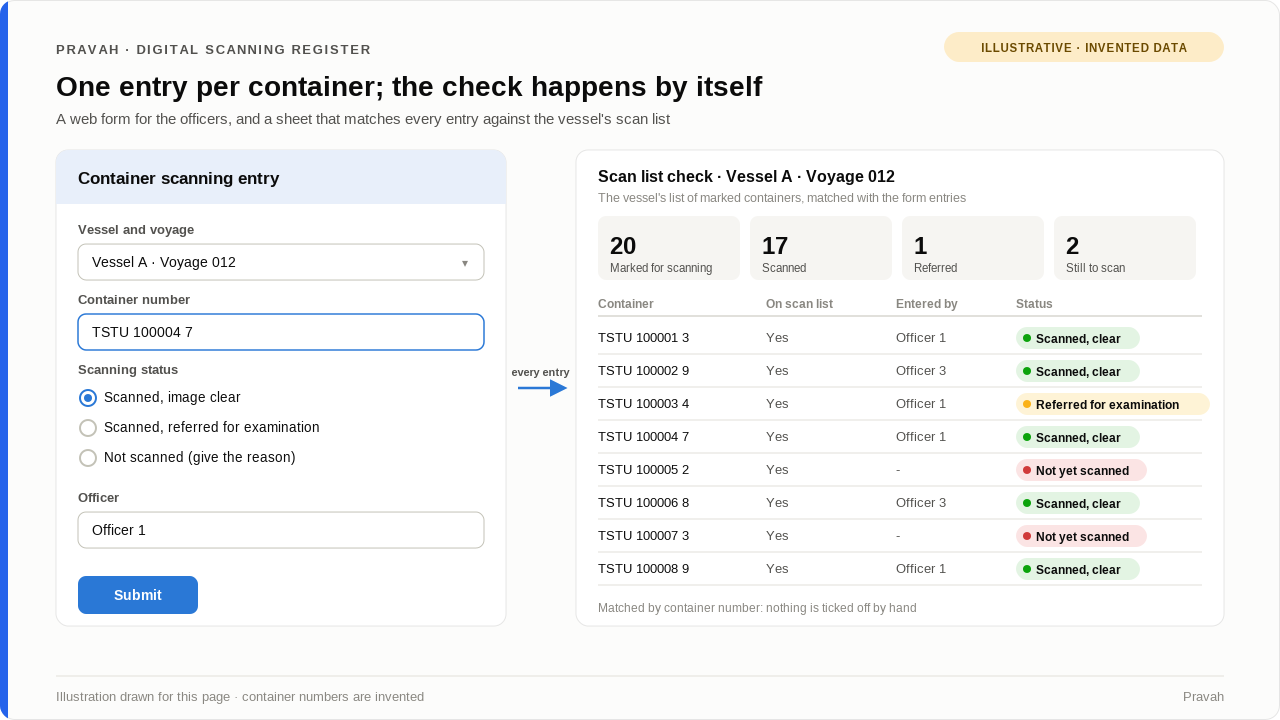
The digital register: a form for the officers, and a sheet that reconciles every entry with the vessel’s scan list. Illustrative, with invented container numbers.
Using Microsoft Forms, I set up a web form in which officers simply enter the container number they are scanning and its scanning status. The responses land in an Excel sheet that is connected to the vessel’s scan list, so every entry is matched automatically by container number. What has been scanned, what was referred for examination and what is still outstanding shows up straight away, with no registers to go through by hand.
This was a small project, but it applies classic operations thinking. Each of the old problems maps onto a recognised form of waste in lean management:
Waste
Where it appeared
What removed it
Transport
Receipts carried between floors
Both systems in one room
Waiting
Trucks and officers waiting for paperwork
The image reaches officer 2 the moment it is taken
Motion
Officers and staff walking between floors
One room, one window
Over-processing
Repeated handwritten endorsements
A single entry in a form
Defects
Containers missed or wrongly recorded in manual registers
Automatic matching against the scan list
Unused capacity
Officers rostered without knowing the workload
Advance scan lists for every vessel
Capacity, not effort, was the real issue. At 6-7 minutes a container, one scanner could clear only about 9 or 10 containers an hour; at under a minute, the same scanner could clear around 60. Once its capacity comfortably exceeded the rate at which trucks arrived, the queue had nothing left to build on.
Faster clearance: from 6-7 minutes to 45 seconds to a minute per container, about 85% less time.
No more queues: the line of trucks waiting at the scanner cleared, easing congestion and speeding up the release of cargo.
Control kept intact: every image is still read by a second officer before release; the process got faster without weakening enforcement.
People matched to the work: advance scan lists let the unit roster officers to the expected volume.
Complete, provable scanning: for every vessel, it is clear at a glance which marked containers have been scanned, referred or are still outstanding, with a digital record behind each entry.
Almost no cost: a change of layout and procedure plus tools that were already available, Microsoft Forms and Excel; no new system to buy.